
Venue Reservation
Management System
Solution Design Guide
Comprehensive documentation for implementing and maintaining enterprise-grade venue reservation systems with focus on reliability, security, and operational excellence
System Overview
This comprehensive design guide provides complete documentation for implementing a professional venue reservation management system. The solution encompasses room booking displays, centralized management platforms, and integrated supporting infrastructure designed for corporate offices, conference centers, hotels, and other professional environments.
The system delivers real-time room availability information, seamless booking workflows, and comprehensive management capabilities while ensuring high reliability, security, and ease of maintenance.
Available Chapters
System Composition
Comprehensive overview of system architecture, components, and functional relationships.
Design Methodology
Design principles, decision-making frameworks, and key considerations.
Scenarios & Selection
Typical deployment scenarios and technical route analysis.
Architecture Design
System topology and core functionality requirements.
Selection & Interfaces
Core product selection and technical specifications.
Security & Risks
Security architecture and risk assessment.
Supporting & Integration
Infrastructure integration and supporting systems.
Tools & Materials
Equipment lists and auxiliary materials.
Calculators
Interactive calculators for capacity planning.
Quality & Acceptance
Quality standards and acceptance criteria.
Installation & Debugging
Installation requirements and troubleshooting.
Operations & Maintenance
Daily monitoring and maintenance procedures.
1. System Composition
1.1 System Architecture Overview
The venue reservation management system consists of three primary layers working in concert to deliver a complete booking solution. Each layer serves specific functional requirements while maintaining clear interfaces and dependencies.
1.2 Core Components
- Display Terminals: Wall-mounted or desktop electronic displays showing real-time room status, schedules, and booking information at each venue entrance
- Management Server: Centralized application server handling booking logic, user authentication, calendar synchronization, and system configuration
- Database System: Persistent storage for booking records, user profiles, room configurations, and audit logs
- Network Infrastructure: Ethernet backbone with PoE support for terminal power delivery and data communication
- Integration Interfaces: APIs and connectors for calendar systems (Exchange, Google Workspace), access control, and third-party applications
1.3 Functional Relationships
Display terminals communicate with the management server via RESTful APIs over secure HTTPS connections. The server processes booking requests, validates against business rules, and synchronizes with external calendar systems. All transactions are logged to the database with full audit trails.
Users can initiate bookings through multiple channels: directly at the display terminal touchscreen, via web portal, mobile application, or integrated calendar clients. All booking channels converge at the management server for centralized processing and conflict resolution.
1.4 System Capacity and Scalability
The architecture supports horizontal scaling to accommodate growing deployments. A single management server can handle up to 500 display terminals with sub-second response times. For larger installations, load balancing and database clustering provide linear scalability.
| Component | Typical Capacity | Scaling Method |
|---|---|---|
| Display Terminals | 500 per server | Add application servers |
| Concurrent Users | 2000 per server | Load balancing |
| Booking Transactions | 100 per second | Database clustering |
| Storage Capacity | 5 years of data | Archive to cold storage |
2. Design Methodology
2.1 Design Principles
The system design follows enterprise architecture best practices with emphasis on reliability, maintainability, and user experience. Core principles include:
- Reliability First: System availability target of 99.9% through redundancy, failover mechanisms, and graceful degradation
- User-Centric Design: Intuitive interfaces requiring minimal training, with booking completion in under 30 seconds
- Security by Design: Defense-in-depth approach with encryption, authentication, authorization, and audit logging at every layer
- Operational Simplicity: Automated monitoring, self-healing capabilities, and centralized management to minimize operational overhead
- Future-Proof Architecture: Modular design with standard interfaces enabling technology refresh without system-wide replacement
2.2 Decision-Making Framework
Technology and vendor selection follows a structured evaluation process considering total cost of ownership, vendor stability, product maturity, and ecosystem compatibility. Key decision criteria include:
| Criterion | Weight | Evaluation Method |
|---|---|---|
| Functional Fit | 30% | Requirements checklist |
| Reliability & Performance | 25% | Benchmark testing |
| Total Cost of Ownership | 20% | 5-year TCO model |
| Vendor Support | 15% | SLA review and references |
| Integration Capability | 10% | API documentation review |
2.3 Key Considerations
Network Dependency: The system requires continuous network connectivity for real-time synchronization. Display terminals include local caching to show current bookings during brief network interruptions, but new bookings require server connectivity.
Calendar Integration: Bidirectional synchronization with Microsoft Exchange or Google Workspace is essential for user adoption. Design must handle calendar conflicts, recurring meetings, and timezone conversions correctly.
Physical Installation: Display terminal placement requires careful consideration of power availability, network access, viewing angles, and ADA compliance. Standard mounting height is 48-54 inches from floor to display center.
Change Management: Successful deployment requires user training, clear booking policies, and ongoing support. Plan for 2-4 weeks of parallel operation with existing booking methods during transition.
3. Scenarios & Selection
3.1 Applicable Scope and Constraints
This solution is designed for enterprise-scale deployment in professional environments with managed infrastructure support.
- Operating temperature range: 10°C to 40°C with humidity 20% to 80% non-condensing
- Power supply: PoE (802.3af/at) or local 12V DC with UPS backup recommended
- Network: Managed Ethernet infrastructure with VLAN support
- Installation: Professional deployment with proper cable management
- Integration: Compatible with major calendar systems including Microsoft Exchange and Google Workspace
3.2 Typical Deployment Scenarios
The system supports multiple deployment scenarios, each with specific requirements and configuration recommendations.
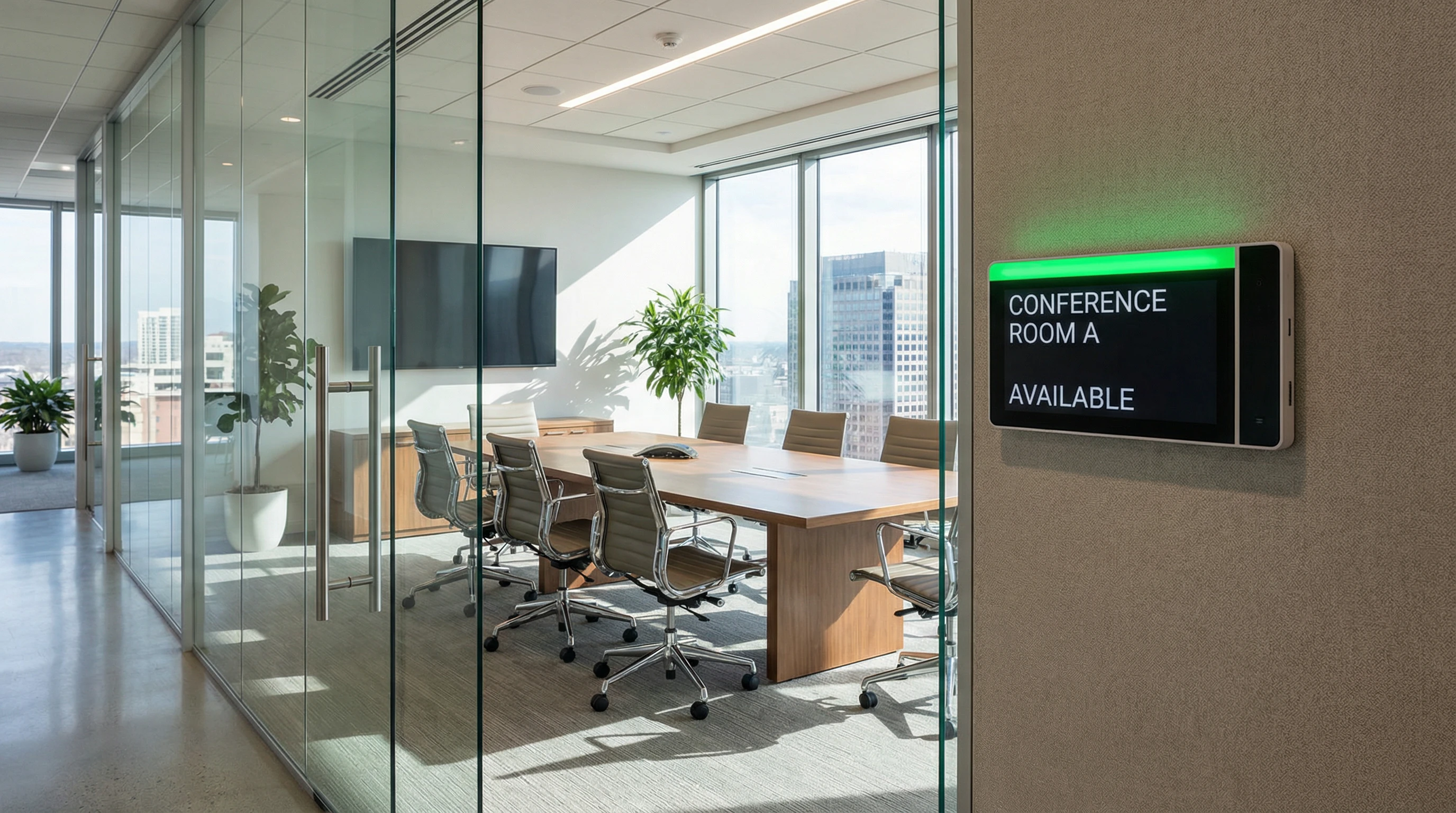
Corporate Office
Modern corporate office environment with multiple meeting rooms and conference spaces. Requires professional appearance, seamless calendar integration, and high reliability.

Conference Center
Large-scale conference and event facility with diverse room types and sizes. Requires robust scheduling capabilities and visitor-friendly interfaces.
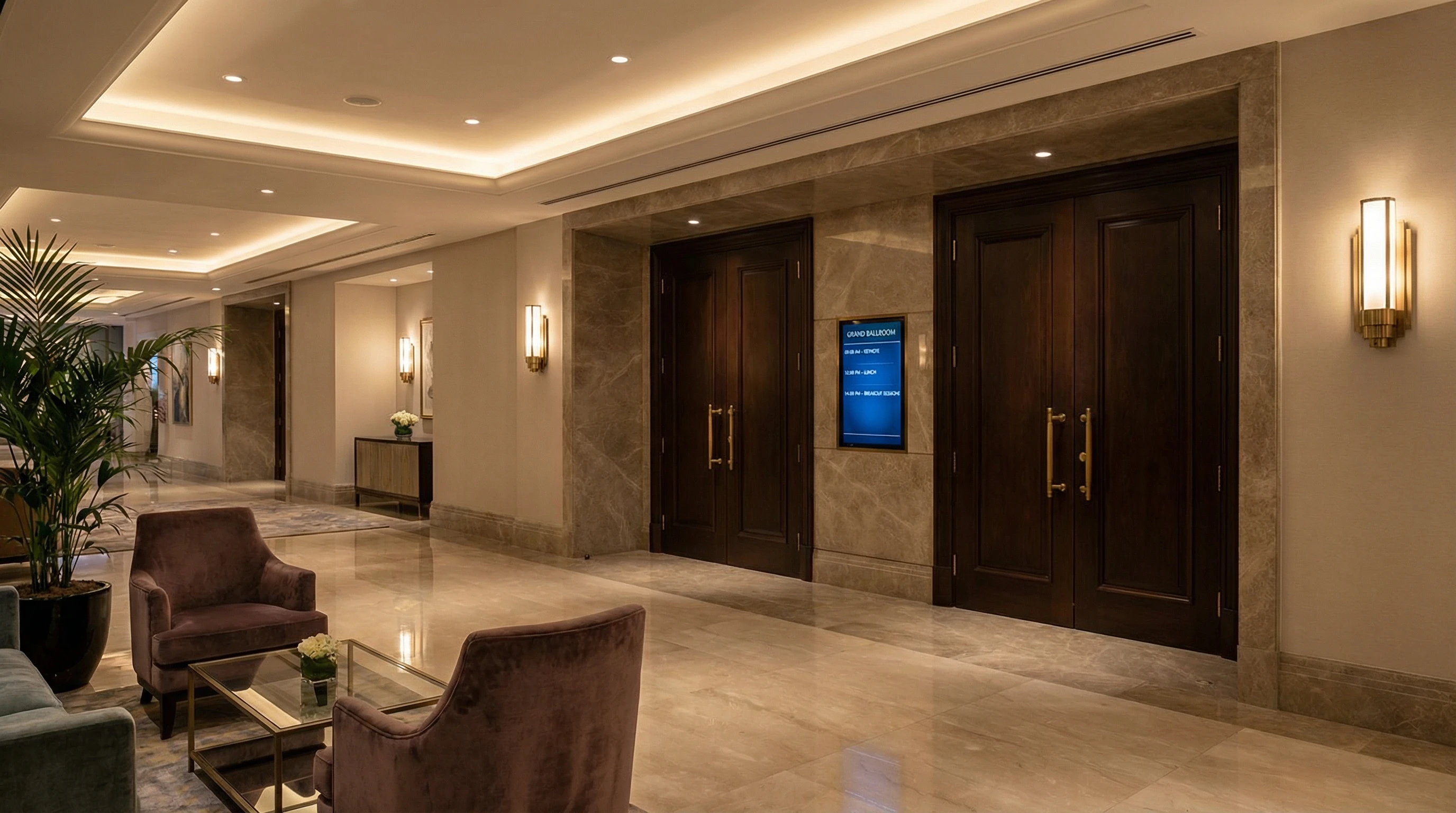
Hotel
Upscale hospitality environment with meeting rooms and event spaces. Requires elegant design, integration with property management systems, and multilingual support.
3.3 Technical Route Selection
Two primary technical approaches are available based on infrastructure and requirements:
| Aspect | Cloud-Hosted | On-Premises |
|---|---|---|
| Initial Cost | Lower (subscription) | Higher (capital) |
| Operational Overhead | Minimal | Requires IT staff |
| Data Control | Vendor-managed | Full control |
| Scalability | Elastic | Manual provisioning |
| Best For | Small to medium deployments | Large enterprises with strict data policies |
4. Architecture Design
4.1 System Architecture Overview
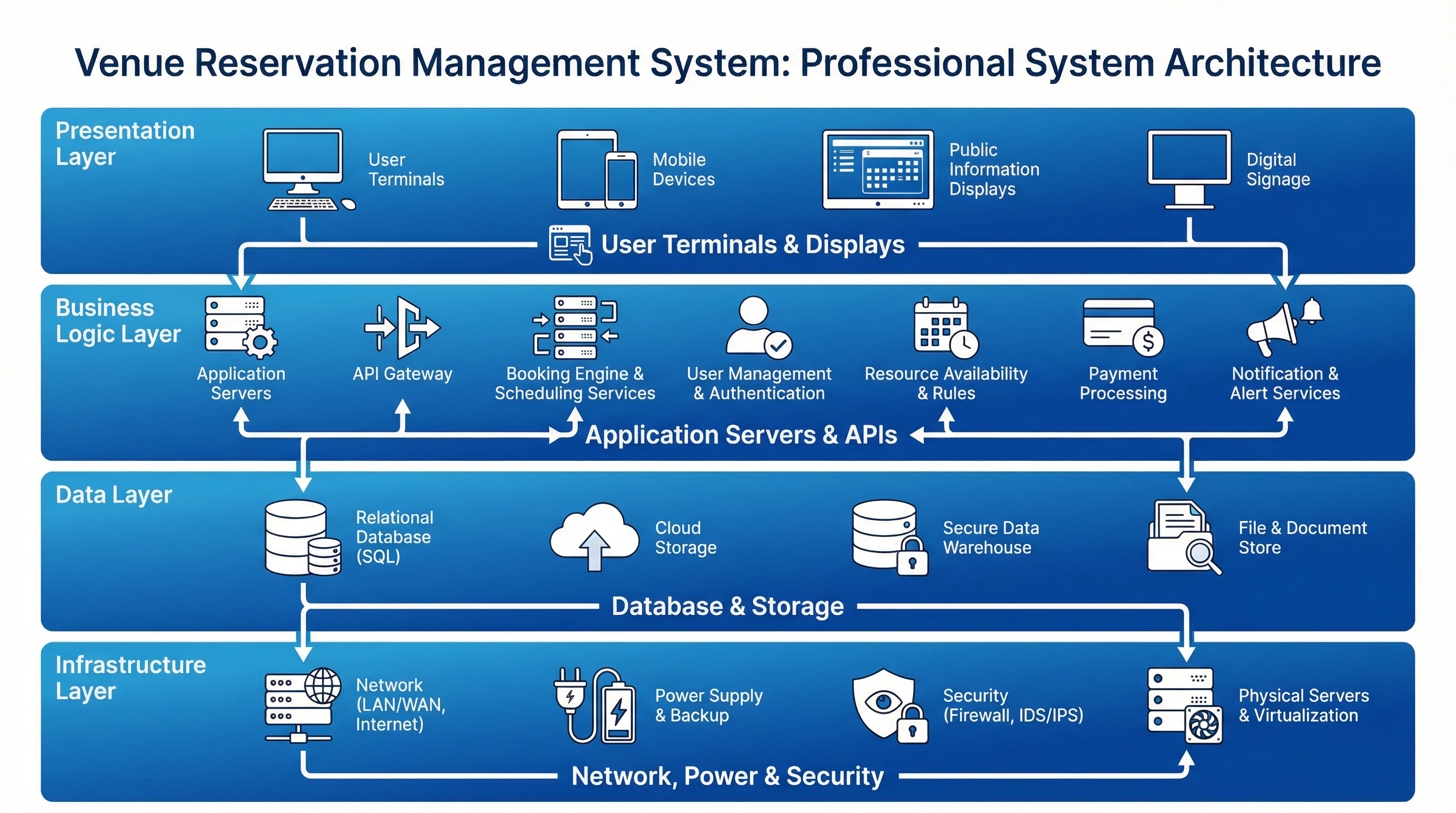
Figure 4.1: Venue Reservation Management System Architecture
The system topology defines the physical and logical arrangement of components, their interconnections, and data flow patterns.
4.2 Core Functionality and Key Metrics
| Metric | Target Value | Measurement Method | Business Impact |
|---|---|---|---|
| System Availability | ≥99.5% | Uptime monitoring with alerting | Service continuity and user satisfaction |
| Booking Response Time (P95) | ≤2 seconds | APM tools and transaction tracing | User experience and adoption |
| Display Refresh Latency | ≤30 seconds | Display update timestamp monitoring | Information accuracy and trust |
| Data Consistency | ≥99% | Periodic audits and reconciliation | Data integrity and booking accuracy |
4.3 Network Architecture
Display terminals connect to dedicated VLANs with QoS policies ensuring priority traffic handling. Management servers reside in secure server VLANs with firewall protection. All inter-VLAN communication traverses Layer 3 switches with ACLs enforcing least-privilege access.
4.4 High Availability Design
Critical components implement redundancy to eliminate single points of failure:
- Active-passive management server cluster with automatic failover
- Database replication with synchronous commits for zero data loss
- Redundant network paths with spanning tree protocol
- UPS backup for display terminals in mission-critical areas
5. Selection & Interfaces
5.1 Core Product Selection
Component selection balances performance, reliability, and total cost of ownership. Recommended specifications for key components:
| Component | Specification | Quantity Guideline |
|---|---|---|
| Display Terminal | 10" touchscreen, PoE powered, Android/Linux OS | 1 per room/venue |
| Management Server | 8 cores, 32GB RAM, 500GB SSD, redundant PSU | 1 per 500 terminals |
| Database Server | 16 cores, 64GB RAM, 1TB SSD RAID10 | 1 primary + 1 standby |
| Network Switch (PoE) | 24-48 ports, 802.3at, Layer 3 capable | Based on terminal count |
5.2 Technical Interfaces
Calendar Integration: Supports Microsoft Exchange Web Services (EWS), Exchange ActiveSync, and Google Calendar API. Bidirectional synchronization ensures bookings made in either system appear in both.
Authentication: Integrates with LDAP, Active Directory, SAML 2.0, and OAuth 2.0 for single sign-on. Supports multi-factor authentication for enhanced security.
Access Control: RESTful API for integration with physical access control systems. Automatically grants door access to meeting participants during their reserved time slots.
Reporting: SQL database with read-only reporting views. Supports standard BI tools (Tableau, Power BI) for usage analytics and capacity planning.
5.3 API Specifications
The system exposes RESTful APIs for third-party integration. All endpoints require OAuth 2.0 authentication with JWT tokens. Rate limiting applies at 1000 requests per hour per client.
Key API endpoints include:
GET /api/v1/rooms- List all rooms with current statusPOST /api/v1/bookings- Create new bookingGET /api/v1/bookings/{id}- Retrieve booking detailsDELETE /api/v1/bookings/{id}- Cancel bookingGET /api/v1/availability- Query room availability
6. Security & Risks
6.1 Security Architecture
The system implements defense-in-depth security with multiple layers of protection:
- Network Security: VLAN segmentation, firewall rules, intrusion detection/prevention systems
- Application Security: Input validation, SQL injection prevention, XSS protection, CSRF tokens
- Data Security: Encryption at rest (AES-256) and in transit (TLS 1.3), database access controls
- Authentication: Strong password policies, multi-factor authentication, session management
- Authorization: Role-based access control (RBAC) with least-privilege principle
- Audit Logging: Comprehensive logging of all security-relevant events with tamper-proof storage
6.2 Risk Assessment
| Risk | Probability | Impact | Mitigation |
|---|---|---|---|
| Network outage | Medium | High | Redundant network paths, local caching on terminals |
| Server failure | Low | High | Active-passive clustering with automatic failover |
| Data breach | Low | Critical | Encryption, access controls, security monitoring |
| Calendar sync failure | Medium | Medium | Retry logic, error alerting, manual reconciliation tools |
| Display terminal failure | Medium | Low | Spare units, remote monitoring, quick replacement |
6.3 Compliance Considerations
Organizations subject to regulatory requirements should consider:
- GDPR: Implement data retention policies, user consent mechanisms, and right-to-deletion workflows
- HIPAA: Enable audit logging, implement BAA with vendors, encrypt PHI data
- SOC 2: Maintain security controls documentation, conduct regular audits, implement change management
6.4 Incident Response
Establish incident response procedures including:
- Detection and alerting through automated monitoring
- Triage and severity assessment within 15 minutes
- Containment actions to limit impact
- Root cause analysis and remediation
- Post-incident review and process improvement
7. Supporting & Integration
7.1 Infrastructure Requirements
The venue reservation system requires supporting infrastructure for reliable operation:
- Network Infrastructure: Gigabit Ethernet backbone with PoE+ support (802.3at minimum). Dedicated VLANs for display terminals and management traffic. QoS policies ensuring booking transactions receive priority.
- Power Infrastructure: UPS backup for critical components (servers, core switches) providing 15-30 minutes runtime. PoE power budget planning allowing 25W per display terminal with 20% overhead.
- Physical Infrastructure: Climate-controlled server room maintaining 18-27°C temperature. Proper cable pathways for terminal installations with concealed conduit preferred.
- Monitoring Infrastructure: SNMP-capable network monitoring system. Syslog server for centralized log collection. APM tools for application performance monitoring.
7.2 Calendar System Integration
Microsoft Exchange Integration: Utilizes Exchange Web Services (EWS) for bidirectional synchronization. Requires service account with impersonation rights. Supports Exchange 2016 and later, Exchange Online.
Google Workspace Integration: Leverages Google Calendar API with OAuth 2.0 authentication. Requires domain-wide delegation for service account. Supports all Google Workspace editions.
Synchronization Behavior: Polls calendar systems every 60 seconds for changes. Implements exponential backoff for rate limiting. Resolves conflicts using "last write wins" with audit trail.
7.3 Access Control Integration
Integration with physical access control systems enables automatic door unlocking during reserved time slots. Supports major access control platforms including:
- HID Global (VertX, Edge)
- Lenel OnGuard
- Software House C-CURE
- Honeywell Pro-Watch
Integration typically uses REST APIs or SOAP web services. Access grants apply 5 minutes before meeting start and revoke 5 minutes after meeting end.
7.4 Directory Services Integration
Authenticates users against existing directory services eliminating separate credential management. Supports:
- Active Directory (LDAP/LDAPS)
- Azure Active Directory (SAML 2.0, OAuth 2.0)
- Okta, Ping Identity, Auth0 (SAML 2.0)
- Generic LDAP directories
7.5 Third-Party Application Integration
Open APIs enable integration with workplace management platforms, visitor management systems, and business intelligence tools. Common integration scenarios include:
- Workplace analytics platforms for space utilization reporting
- Visitor management systems for guest meeting room access
- Catering systems for automatic food service requests
- Video conferencing systems for automatic equipment activation
8. Tools & Materials
8.1 Core Equipment List
Complete bill of materials for a typical 50-room deployment:
| Item | Specification | Quantity | Purpose |
|---|---|---|---|
| Display Terminal | 10" touchscreen, PoE, wall mount | 50 | Room status display and booking interface |
| Management Server | Rack-mount, 8-core, 32GB RAM | 2 | Application server (active + standby) |
| Database Server | Rack-mount, 16-core, 64GB RAM | 2 | Database server (primary + replica) |
| PoE Switch | 48-port, 802.3at, Layer 3 | 2 | Network connectivity for terminals |
| UPS | 1500VA, rack-mount | 2 | Power backup for servers |
8.2 Main Product Images
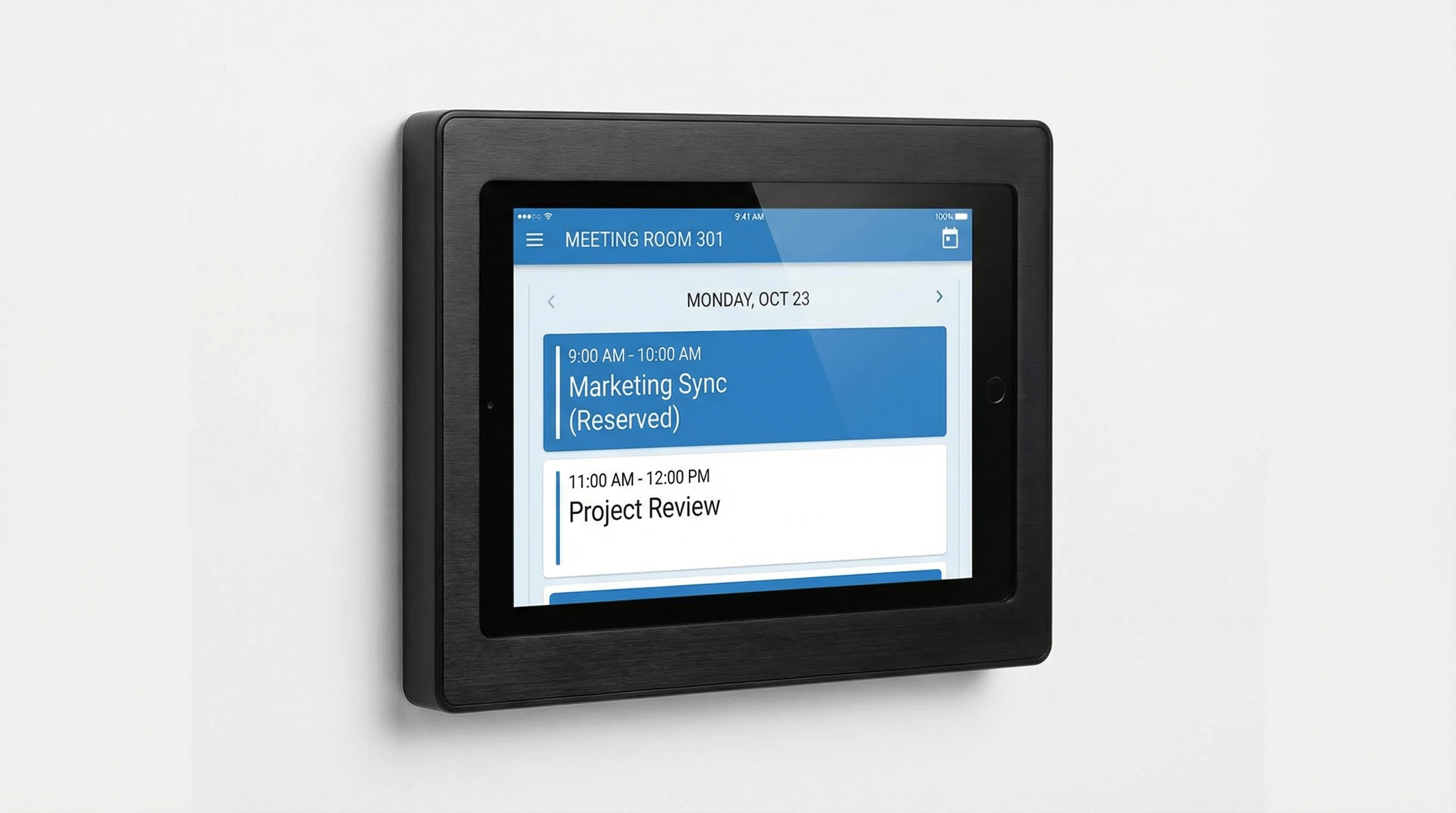
Electronic Display Terminal
Wall-mounted touchscreen display with PoE power. Shows real-time room status, booking schedule, and enables on-the-spot reservations.
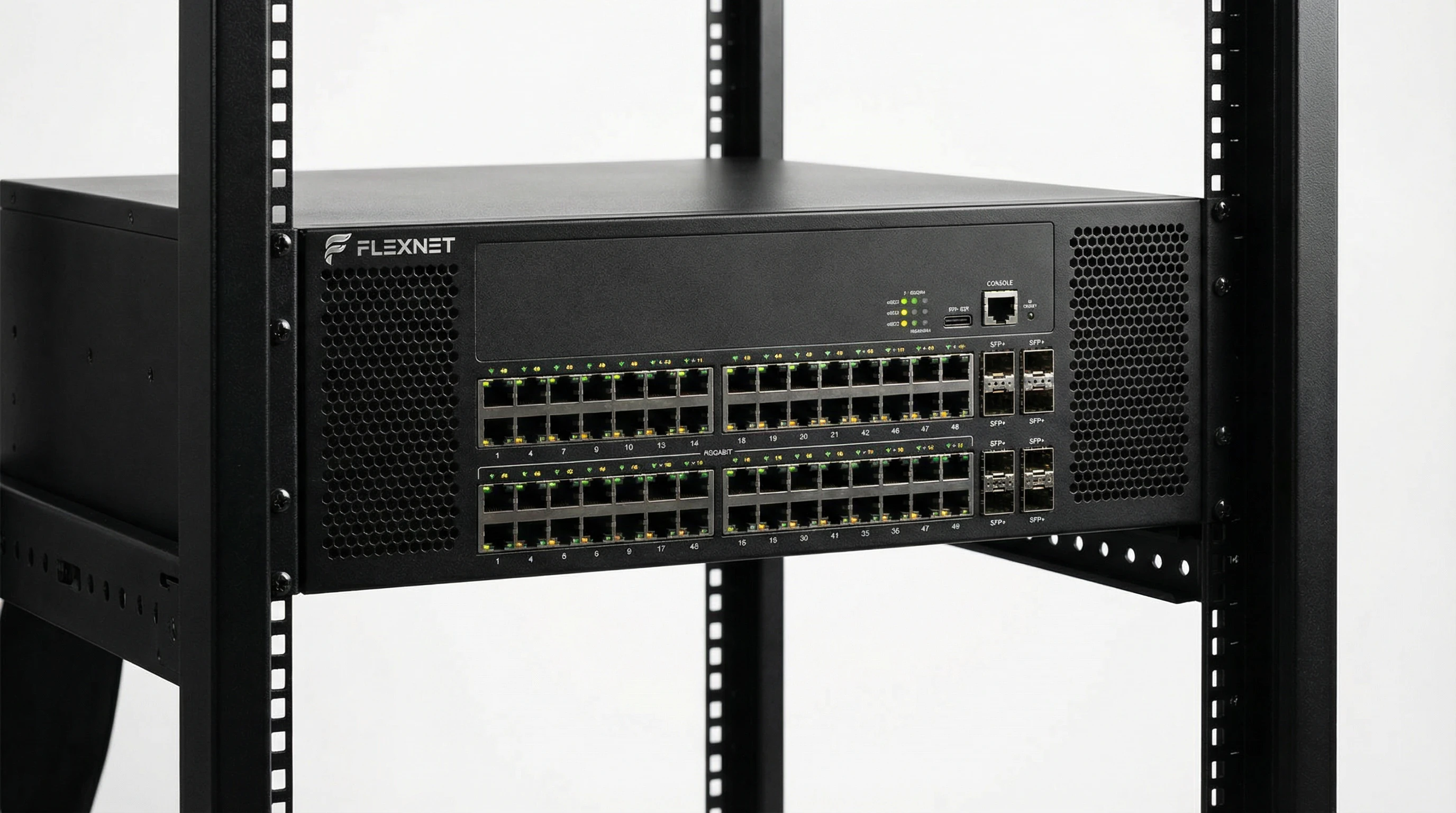
PoE Network Switch
Enterprise-grade managed switch providing network connectivity and power delivery to display terminals via PoE+ standard.
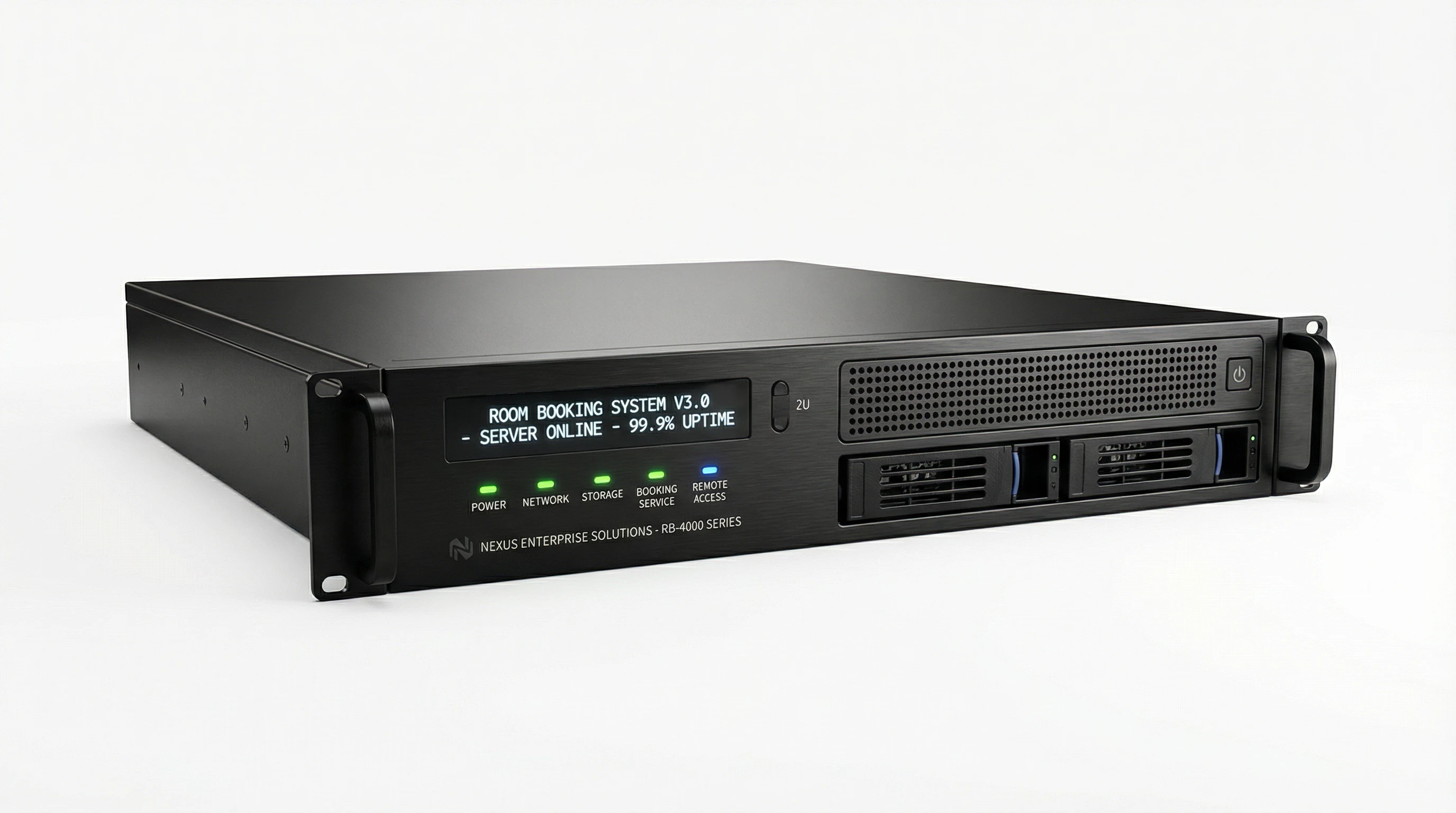
Management Server
Rack-mounted server hardware hosting the booking management application, handling all business logic and integrations.
8.3 Installation Tools and Materials
Required tools and materials for professional installation:
- Cable tester and certifier for network validation
- PoE tester for power delivery verification
- Drill, level, and mounting hardware for terminal installation
- Cable management: conduit, cable trays, tie wraps
- Labeling system for cables and connections
- Laptop with configuration software and documentation
8.4 Auxiliary Materials
- Network Cables: Cat6 or Cat6a for all terminal connections, certified for PoE
- Patch Panels: For structured cabling in wiring closets
- Cable Labels: For identification and troubleshooting
- Wall Plates: For professional cable termination at terminal locations
- Spare Parts: 10% spare terminals, cables, and mounting hardware
9. Calculators
9.1 Network Bandwidth Calculator
Calculate required network bandwidth based on number of display terminals and expected data rate per terminal.
Total Required Bandwidth:
Recommended Switch Port Speed:
9.2 Storage Capacity Calculator
Calculate required storage capacity for booking data, logs, and audit trails.
Required Storage Capacity:
Recommended Database Size:
9.3 UPS Runtime Calculator
Calculate required UPS capacity and expected runtime based on system load.
Total Load:
Required UPS Capacity:
Recommended UPS Model:
10. Quality & Acceptance
10.1 Quality Standards and Differentiation
Quality is not simply about whether a system "works" but rather how reliably it operates over time and how quickly issues can be resolved. Quality directly impacts system stability, fault recovery speed, and operational costs.
Installation Quality Comparison
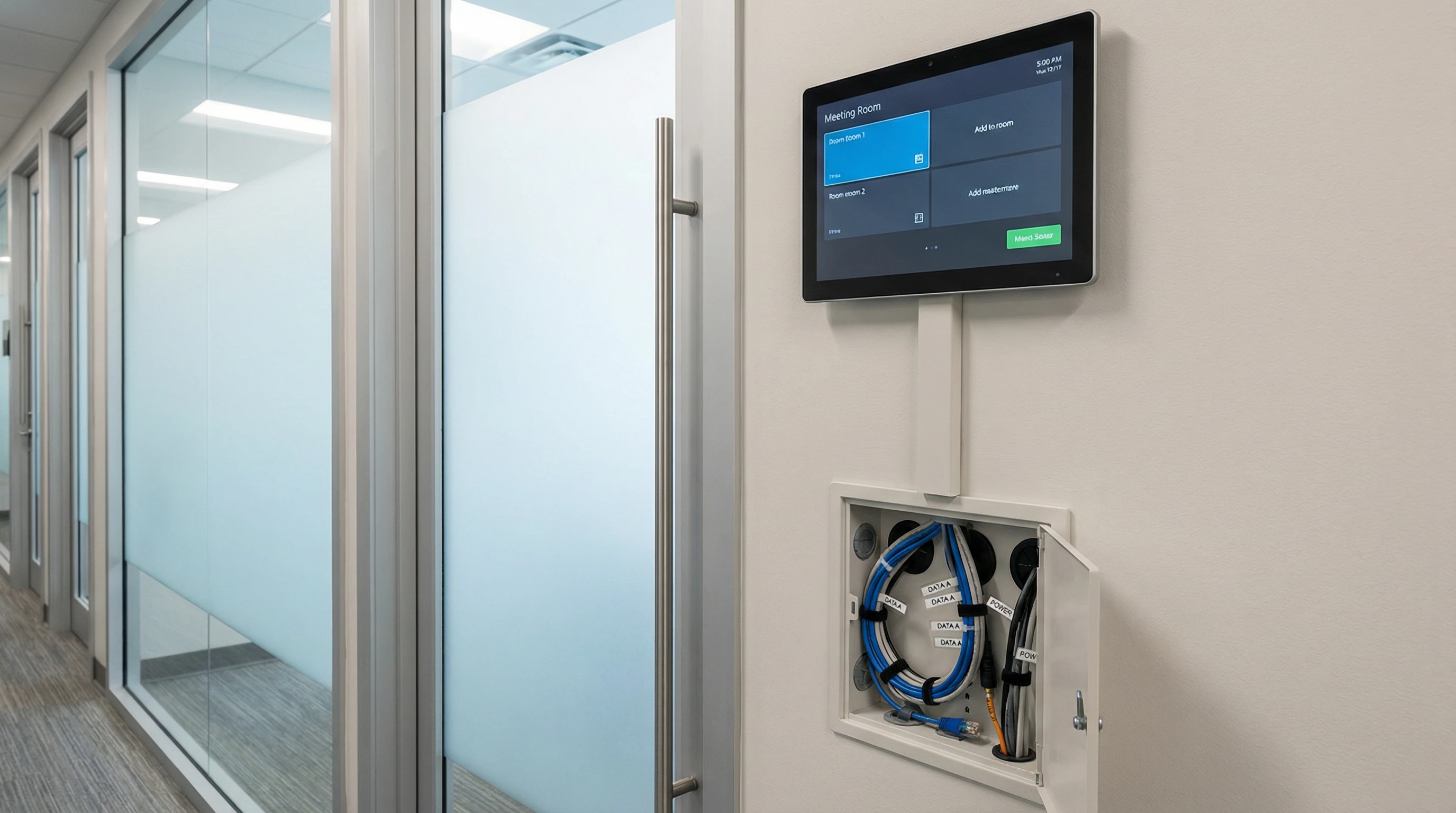
Professional Installation
Characteristics of Excellence
- Display perfectly level and aligned at consistent height
- All cables concealed in wall conduit with proper cable management
- Clear identification labels on all connections
- Proper stress relief preventing cable damage
- Strong/weak electrical separation maintained
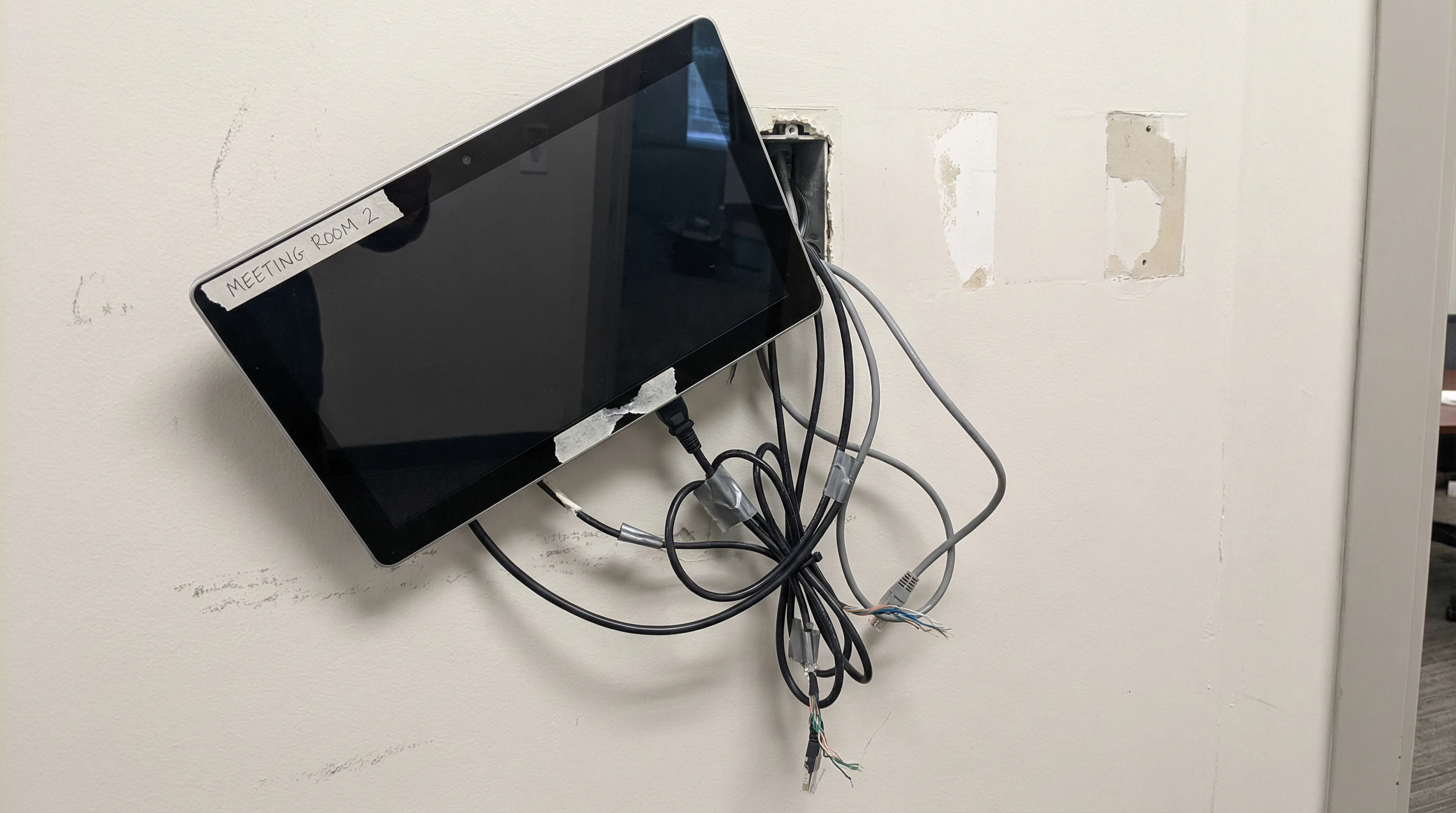
Poor Installation
Common Deficiencies
- Display crooked or misaligned on wall
- Exposed cables hanging loosely without management
- Missing identification labels and documentation
- Cable stress points leading to premature failure
- Power and data cables mixed together without separation
10.2 Quality Verification Methods
Systematic quality verification ensures that all components meet established standards.
- Physical Alignment: Verify display screen horizontal and vertical alignment using level tool
- Cable Management: Inspect cable routing, securing, and labeling
- Network Connectivity: Test link speed, PoE power delivery, and latency
- Functional Testing: Verify booking creation, modification, cancellation workflows
- Integration Testing: Confirm calendar synchronization, authentication, and access control
- Performance Testing: Measure response times under normal and peak load
- Security Testing: Validate encryption, authentication, and authorization controls
10.3 Acceptance Criteria
System acceptance requires meeting all criteria across functional, performance, and operational categories:
| Category | Criterion | Acceptance Threshold |
|---|---|---|
| Functional | All booking workflows operational | 100% of test cases pass |
| Performance | Booking response time (P95) | ≤2 seconds |
| Performance | Display refresh latency | ≤30 seconds |
| Integration | Calendar synchronization | ≥99% success rate |
| Operational | Monitoring and alerting | All critical metrics monitored |
| Documentation | System documentation complete | All required documents delivered |
10.4 Acceptance Testing Procedure
- Pre-acceptance inspection of physical installation quality
- Functional testing of all booking workflows and user interfaces
- Performance testing under simulated load conditions
- Integration testing with calendar and authentication systems
- Security testing and vulnerability assessment
- Operational readiness review (monitoring, backup, documentation)
- User acceptance testing with representative end users
- Final acceptance sign-off and warranty activation
11. Installation & Debugging
11.1 Pre-Installation Requirements
Before beginning installation, verify that all prerequisites are met:
- Network infrastructure ready with VLANs configured and PoE enabled
- Server hardware installed in rack with power and network connectivity
- Calendar system integration credentials and permissions obtained
- Display terminal mounting locations surveyed and approved
- Installation team trained on procedures and safety requirements
11.2 Installation Sequence
- Server Installation (Day 1-2): Rack-mount servers, install operating system and application software, configure network settings, establish database replication
- Network Configuration (Day 2-3): Configure VLANs, enable PoE on switch ports, set up QoS policies, test connectivity
- Terminal Installation (Day 3-5): Mount display terminals at designated locations, run network cables, connect and power on terminals, verify network connectivity
- System Configuration (Day 5-6): Configure room profiles, set up calendar integration, configure authentication, establish monitoring
- Testing and Validation (Day 7-8): Execute test plans, verify all functionality, performance testing, user acceptance testing
- Training and Handover (Day 9-10): Train administrators and end users, deliver documentation, transition to operations team
11.3 Common Installation Issues and Resolutions
| Issue | Symptoms | Resolution |
|---|---|---|
| Terminal not powering on | Black screen, no LED indicators | Verify PoE enabled on switch port, check cable continuity, test with PoE injector |
| Network connectivity failure | Terminal shows "No connection" error | Verify VLAN configuration, check DHCP server, test with static IP |
| Calendar sync not working | Bookings not appearing on display | Verify service account permissions, check firewall rules, review sync logs |
| Slow booking response | Delays of 5+ seconds for bookings | Check network latency, verify server resources, review database performance |
| Authentication failures | Users unable to log in | Verify LDAP/AD connectivity, check user credentials, review authentication logs |
11.4 Debugging Tools and Techniques
Network Debugging: Use ping, traceroute, and packet capture tools to diagnose connectivity issues. Verify PoE power delivery with PoE tester. Check switch port status and statistics.
Application Debugging: Review application logs for error messages. Enable debug logging for detailed troubleshooting. Use API testing tools (Postman) to test integrations.
Database Debugging: Query database directly to verify data consistency. Review slow query logs for performance issues. Check replication status and lag.
11.5 Post-Installation Checklist
- All display terminals operational and showing correct room information
- Calendar synchronization working bidirectionally
- User authentication functional for all user types
- Monitoring and alerting configured and tested
- Backup procedures established and tested
- Documentation complete and delivered
- Training completed for administrators and end users
- Support procedures and escalation paths established
12. Operations & Maintenance
12.1 Daily Operations
Routine daily operations ensure system health and rapid issue detection:
- Review monitoring dashboard for alerts and anomalies
- Check calendar synchronization status and error logs
- Verify all display terminals are online and responsive
- Monitor system performance metrics (response time, CPU, memory)
- Review user-reported issues and prioritize resolution
12.2 Preventive Maintenance Schedule
| Frequency | Task | Estimated Time |
|---|---|---|
| Daily | Review monitoring alerts and system health | 15 minutes |
| Weekly | Review system logs for errors and warnings | 30 minutes |
| Weekly | Verify backup completion and test restore | 45 minutes |
| Monthly | Review capacity metrics and plan for growth | 1 hour |
| Monthly | Apply security patches and updates | 2-4 hours |
| Quarterly | Conduct disaster recovery drill | 4 hours |
| Annually | Review and update system documentation | 8 hours |
12.3 Monitoring and Alerting
Comprehensive monitoring enables proactive issue detection and resolution:
Critical Alerts (immediate response required):
- Management server offline or unreachable
- Database replication failure or significant lag
- Calendar synchronization completely failed
- More than 10% of display terminals offline
- Authentication system unavailable
Warning Alerts (response within 4 hours):
- Server CPU or memory utilization above 80%
- Disk space utilization above 75%
- Calendar sync error rate above 5%
- Individual display terminals offline
- Booking response time degradation
12.4 Backup and Recovery
Backup Strategy:
- Full database backup daily at 2:00 AM
- Incremental transaction log backup every 4 hours
- Configuration backup after any system changes
- Backup retention: 30 days online, 1 year archived
- Offsite backup copy for disaster recovery
Recovery Procedures:
- Assess scope of data loss or corruption
- Identify most recent clean backup
- Restore database from backup to standby server
- Verify data integrity and consistency
- Switch application to restored database
- Verify system functionality
- Document incident and recovery actions
12.5 Performance Optimization
Regular performance tuning maintains optimal system responsiveness:
- Review and optimize slow database queries
- Analyze application performance metrics and bottlenecks
- Adjust caching strategies based on usage patterns
- Archive old booking data to maintain database performance
- Review and adjust resource allocation (CPU, memory) as needed
12.6 Capacity Planning
Proactive capacity planning prevents performance degradation as usage grows:
- Monitor booking volume trends and growth rate
- Track server resource utilization over time
- Project future capacity requirements based on growth
- Plan hardware upgrades or additional servers 6 months in advance
- Review network bandwidth utilization and plan upgrades
12.7 End-of-Life and Replacement
Plan for component lifecycle and replacement:
- Display terminals: 5-7 year expected lifespan
- Servers: 5 year refresh cycle recommended
- Network switches: 7-10 year lifespan
- Software: Plan for major version upgrades every 3-5 years
- Maintain spare parts inventory for quick replacement